



Your gym probably runs on 8-12 different software platforms right now. Member management in one system, class scheduling in another, payment processing somewhere else, marketing automation scattered across three more tools, and that custom spreadsheet your manager built for tracking equipment maintenance that nobody else understands.
Each integration promised to solve a problem. Most created three new ones.
The real killer isn't the monthly fees adding up to $1,400 or whatever painful number you're at. It's the Tuesday morning when your class booking system stops talking to your payment processor, and suddenly 40 members can't reserve spots for the 6am CrossFit class. Your front desk scrambles with manual workarounds while angry texts pile up. By noon you've lost two membership cancellations from frustrated regulars who "just wanted things to work like they used to."
This pattern destroys gym operations. Not because the software is broken, but because nobody evaluated these tools through an operational lens before committing. They looked at features, pricing, maybe a demo. Nobody asked what happens when the integration fails at 5:45am.
Why gyms get trapped in integration hell
Fitness businesses accumulate software like members accumulate forgotten water bottles. Each purchase makes sense alone. The class scheduling tool genuinely improves booking flow. The nutrition tracking app adds value for personal training clients. The automated billing system reduces failed payments by 15%.
Then month four arrives. Your trainers juggle three different apps to manage one client. The front desk needs four browser tabs open to answer basic member questions. Data lives in silos - member Jenny's billing info is current in one system but her contact details are outdated in two others. When she doesn't receive class cancellation notices because the integration broke silently last week, she blames your gym, not your tech stack.
The operational burden multiplies with each addition. Training new staff takes twice as long because they need to learn multiple systems. Simple tasks like pulling monthly revenue reports require exporting data from three places and manually reconciling in Excel. Your operations manager spends more time fighting with software than improving member experience.
Meanwhile, switching costs climb. Not just financially, but operationally. That member data spread across five systems? Good luck migrating it cleanly. The custom workflows your team built around software limitations? Those need complete redesigns. The integrations you've cobbled together with Zapier and prayer? Starting from scratch.
Most gym owners realize they're trapped only after it's too expensive to escape.
Building an integration evaluation framework that actually protects operations
Before adding any new software to your gym's tech stack, you need a systematic way to evaluate operational impact. Not the vendor's promise of what could work, but a realistic assessment of what will break and when.
End appointment chaos and boost attendance.
Gymioly streamlines booking, confirms sessions, and manages memberships effortlessly.
- Unified class and membership management
- Automated member notifications
- Trainer scheduling and availability
No credit card required
This framework focuses on five critical areas:
Data ownership and portability Who actually controls your member data once it enters their system? Can you export everything - not just emails and names, but purchase history, class attendance, trainer notes, communication logs? In what format? CSV files are fine for contact lists but useless for preserving relationships between data points. Test this during trials. Actually export data. Try importing it somewhere else. If the vendor makes this difficult during the sales process, imagine how cooperative they'll be when you're leaving.
Failure modes and fallback procedures Every integration will fail. The question is how gracefully it fails and whether your operations can continue. When the payment gateway goes down, can members still check in for classes? When the scheduling API breaks, do automated confirmations pile up unsent or does the system notify someone?
Document specific failure scenarios. Internet outage at your location. Vendor server downtime. API rate limiting during peak hours. Authentication token expiration. Version conflicts after updates. For each scenario, identify who gets notified, what the manual workaround is, how long until operations degrade, and what data might be lost.
Maintenance burden and technical debt Some integrations need constant babysitting. Others run for months untouched. The difference determines whether your operations manager manages operations or manages software.
Watch for warning signs:
-
Regular manual data syncs required
-
Frequent "re-authorization required" messages appearing
-
Custom code or scripts needed to bridge gaps
-
Workarounds becoming standard procedure
-
Staff avoiding certain features due to unreliability
Calculate the real time cost. If staff spends 20 minutes daily on integration maintenance, that's 120 hours annually - three full work weeks managing software glue.
Total cost trajectory The monthly subscription price is marketing fiction. Real costs include:
Initial setup and migration: Often 2-3x the quoted "onboarding fee" once you factor in data cleaning, staff training, and parallel running periods.
Ongoing operational overhead: Time spent on maintenance, troubleshooting, training, and workarounds. Usually 10-15 hours monthly for poorly integrated systems.
Scaling penalties: Most vendors price reasonably for your current size then punish growth. That $99/month tool becomes $399 when you hit arbitrary thresholds. Review pricing tiers for 2x and 5x your current volume.
Exit costs: Data export fees, contract penalties, migration services, operational disruption. Budget 4-6 months of subscription cost for leaving any deeply integrated system.
Exit planning and vendor lock-in Before you enter, know how you'll leave. Vendors make this deliberately opaque because lock-in is their business model. Your evaluation needs to pierce through the sales fog.
Critical questions requiring written answers:
-
What's the contract cancellation process and timeline?
-
Which data can be exported and in what formats?
-
Do integrations break immediately upon cancellation?
-
Are there post-cancellation data retention requirements?
-
Can you maintain read-only access during transition?
Get these answers in writing before signing anything. Verbal assurances from sales reps evaporate when you actually need them.
The audit checklist that reveals operational reality
Here's the evaluation framework distilled into specific questions for vendor assessment.
Data Control Audit
| Question | Why It Matters | Red Flag Answer |
|---|---|---|
| Can I export all data with one click, or does it require multiple exports? | Reveals data silos and export complexity | "It depends on what data you need" |
| Does exported data maintain relationships (member linked to purchases linked to classes)? | Tests true portability | "You'll need to reconstruct those" |
| What data cannot be exported? | Identifies vendor lock-in tactics | "Some processed analytics are proprietary" |
| Who owns derived data (analytics, predictions, suggestions)? | Clarifies ownership of business insights | "That becomes part of our platform IP" |
| How long does data remain accessible after cancellation? | Planning transition timelines | "Standard is 30 days" |
| Can I delete all data on demand for privacy compliance? | GDPR/privacy requirement | "We maintain some records for legal reasons" |
| Is there API access for automated backups? | Technical data protection | "That's an enterprise feature" |
Integration Reliability Audit
-
What happens to scheduled tasks when the integration breaks?
-
How are failed syncs handled - retry, queue, or lost?
-
Where are error logs accessible and how detailed?
-
What's the average monthly downtime over the past year?
-
How many breaking changes to APIs in the past 12 months?
-
Is there a status page with real-time system health?
-
What's the SLA for critical integration fixes?
Operational Overhead Audit
-
How many staff hours needed for initial setup and training?
-
What regular maintenance tasks are required?
-
How often do updates require workflow adjustments?
-
Can multiple staff manage without additional licenses?
-
Is phone support included or email only?
-
What's the average response time for support tickets?
-
Are there integration specialists or just general support?
Cost Scaling Audit
-
Show me the exact pricing for 2x our current members
-
What triggers price tier changes?
-
Are there overage charges or hard limits?
-
Do integration costs scale separately?
-
What's the price increase history (last 3 years)?
-
Are we grandfathered at current pricing or subject to increases?
-
What features are add-ons versus included?
Exit Strategy Audit
-
Walk me through the exact cancellation process
-
Show me an actual data export file
-
What happens to member-facing features immediately upon cancellation?
-
Are there any fees for data export or migration assistance?
-
Can I maintain read-only access during transition?
-
What's your standard transition period policy?
-
Have you helped other gyms migrate away? Can I speak with one?
Use this during demos, trials, and contract negotiations. Their reaction to these questions tells you everything about their operational maturity.
Testing integrations before operational commitment
The vendor demo shows perfect scenarios. Your gym operates in chaos. Bridge this gap through structured testing that mirrors actual operational conditions.
Start with a limited pilot. Choose one trainer or one class type. Run it for a full month - long enough for edge cases to surface. Week one always works. Week four reveals reality.
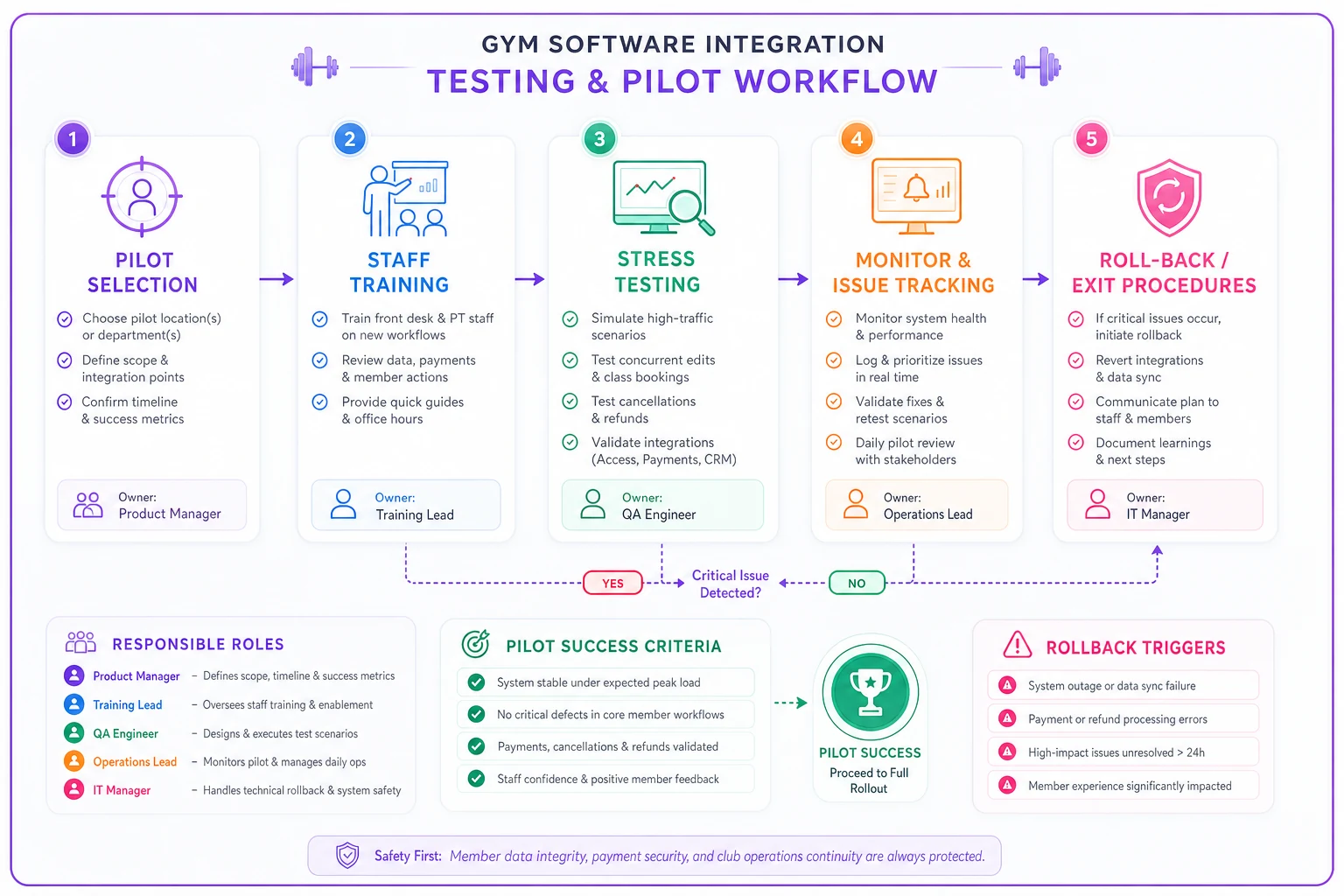
Create deliberate stress tests. Have five staff members enter conflicting data simultaneously. Schedule then reschedule then cancel a complex series of bookings. Process refunds, partial payments, and membership freezes. Import messy data with duplicates and missing fields. Disconnect internet mid-transaction. Change user permissions during active sessions.
Run your pilot with a single location or off-peak schedule to limit member impact while surfacing edge cases.
Document everything that breaks, feels clunky, or requires explanation. These friction points compound when scaled across your full operation.
Monitor the human side. How many questions do staff ask? What workarounds do they create? Where do they revert to old methods? Staff resistance often signals operational friction the vendor won't acknowledge.
Calculate actual time investment. Track every minute spent on setup, training, troubleshooting, and daily use. Compare against current methods. That "time-saving" integration might actually add operational overhead.
When integration complexity becomes an operational liability
There's a tipping point where your tech stack transforms from operational asset to operational burden. It usually arrives gradually, then suddenly.
The warning signs compound. Staff develops elaborate workarounds that new employees can't follow. Simple member requests require checking multiple systems. Your operations manager spends more time in software admin panels than on the gym floor. Data discrepancies create member disputes weekly.
Recognition comes during crisis. A payment processing issue cascades through three connected systems. Fixing one breaks another. Your team scrambles while members wait. The integration that promised efficiency now paralyzes operations.
Some gyms hit this point at five integrations. Others manage fifteen successfully. The difference isn't technical sophistication - it's operational discipline.
Every integration needs an owner, a purpose, and a measurable benefit. When you can't articulate all three, you've crossed into liability territory.
The path back requires painful decisions. Consolidation means lost features. Simplification means admitting expensive mistakes. But operational clarity beats feature abundance every time.
Consider a typical recovery pattern: A gym running twelve integrated systems cuts back to five core platforms. They lose some automation, some detailed analytics, maybe some member-facing features. But staff stress drops dramatically. Training new employees takes days not weeks. Members get consistent experiences. The operation becomes manageable again.
The gyms that recognize this early protect their operational foundation. They resist feature creep that adds complexity without proportional value.
Negotiating integration terms that protect your operations
Vendors draft contracts to protect themselves, not your operations. Standard terms assume you'll never leave, never scale dramatically, and never need exceptional support. Your negotiation needs to flip these assumptions.
Start with data ownership. Strike any clause claiming vendor rights to aggregated or anonymized data. Your member behavior patterns are competitive advantage, not their product development feedback. Demand explicit confirmation that all data remains yours, exportable on demand, in usable formats.
Push for operational SLAs beyond uptime percentages. 99.9% uptime sounds impressive until you realize that allows 43 minutes of downtime monthly - potentially during your Monday evening rush. Demand credits for downtime during your peak hours. Get response time guarantees for integration-specific issues, not generic support tickets.
Negotiate scaling triggers carefully. That "up to 1000 members" tier might seem generous with your current 650. But growth to 1001 members shouldn't triple your monthly cost. Push for graduated increases or member-based pricing without cliff edges.
Build in escape clauses. Require month-to-month terms after an initial period. Avoid auto-renewal clauses that require 90-day cancellation notice. Demand penalty-free exit if the vendor makes material changes to integration capabilities.
Get everything documented. Sales promises evaporate. Email confirmations get lost. Contract addendums clearly stating your operational requirements survive vendor personnel changes and corporate acquisitions.
The difference between integration and operational transformation
Most gyms confuse adding software with improving operations. They're different things entirely.
Adding software is buying a scheduling tool. Improving operations is redesigning your booking flow to reduce no-shows by 30%.
Adding software is installing payment processing. Improving operations is restructuring billing cycles to improve cash flow predictability.
The best integrations enable operational transformation rather than just digitizing existing processes. They centralize previously scattered data. They automate genuinely repetitive tasks. They surface insights that change decisions.
Bad integrations just move problems online. The scheduling confusion that happened at the front desk now happens in an app. The billing errors that required manual fixes now require technical support tickets. The member communication gaps persist across new channels.
This distinction matters because operational transformation requires more than technology. It needs process redesign, staff buy-in, member education, and sustained commitment. The software is maybe 30% of the solution.
When evaluating integrations through this lens, most fail. They solve technical problems, not operational ones. They add complexity without removing friction. They promise transformation but deliver digitization.
The integrations worth pursuing fundamentally change how work gets done. They eliminate entire categories of tasks rather than making them slightly faster. They prevent problems rather than managing them better. They scale without proportional human overhead.
This is where thoughtfully designed operational software makes a difference. Instead of connecting six different tools with fragile integrations, purpose-built platforms handle member management, scheduling, billing, and communication in unified workflows. The reduction in integration complexity alone recovers 10-15 hours monthly for most gyms.
Protecting your gym's operational future
Your tech stack decisions today determine your operational flexibility tomorrow. Every integration added without proper evaluation increases switching costs, operational overhead, and the risk of cascading failures.
The framework presented here isn't about avoiding technology. It's about choosing technology that serves your operations rather than constraining them. The audit questions force vendors to reveal operational reality behind sales promises. The testing methodology surfaces problems before they become embedded in your workflows.
Most importantly, this approach recognizes that gym operations are about human coordination, not software features. The best member experience comes from staff who aren't fighting with technology. The most sustainable growth comes from operations that scale smoothly. The highest member retention comes from consistency and reliability.
Your next integration decision will either add to your operational burden or reduce it. The checklist and framework above help ensure you know which one you're choosing before it's too late to change course.
The gyms that thrive over the next few years won't be the ones with the most features or the latest technology. They'll be the ones that chose integrations wisely, protected their operational flexibility, and maintained the ability to adapt as their business evolved.
Ready to elevate your gym operations?
Join 2,000+ gyms using Gymioly to reduce admin overhead, improve member experience, and grow revenue.