


Most gym owners set class capacity the same way they've done it since 2008: count the equipment, subtract two for safety, call it done. Meanwhile, their Wednesday noon yoga has twelve people rattling around in a forty-person studio while members get turned away from a "full" Saturday bootcamp that ends up running at 60% capacity after no-shows.
The gap between scheduled capacity and actual attendance kills revenue in ways that compound over months. Not just the obvious lost drop-in fees or guest passes, but the harder-to-measure damage when regular members can't get into their preferred classes and start quietly checking out competitor schedules. A CrossFit box near Denver lost eleven members over three months—all because their 5:30am class stayed capped at sixteen despite averaging closer to twelve once you account for no-shows.
Why Standard Capacity Models Break Down
Traditional capacity planning assumes perfect attendance. Equipment-based limits make sense on paper—you've got twenty bikes, so twenty riders maximum. Simple math, until you factor in member behavior that shifts based on season, instructor, time slot, weather, local events, and a dozen other variables most booking systems never track.
Looking at booking data from around forty fitness studios, the attendance variance was striking. Monday 6am classes averaged 78% attendance in January, dropped to 62% by March, then bounced between 70-75% through summer. Same class, same instructor, completely different actual capacity needs throughout the year. One Orange Theory franchise was turning away eight to ten potential bookings per week during their "slow" season because their system couldn't differentiate between registered and realistic capacity.
The problem compounds when you factor in member segments. Unlimited members book differently than class pack holders. Annual members show up more consistently than month-to-month. New members in their first thirty days have different patterns than three-year veterans. Most booking systems treat every reservation identically anyway, which means the data you're working with is already flawed.
Then there's the waitlist psychology problem. Set triggers too early and members stop bothering to join lists they assume won't clear. Set them too late and you're scrambling to fill spots when three people cancel ninety minutes before class. A Portland barre studio found their waitlist conversion dropped to 11% once lists hit five people—members just assumed they wouldn't get in and made other plans.
Building a Data-Driven Capacity Model
The solution isn't complicated math. It's using the attendance data you already have to make smarter decisions. Pull twelve weeks of historical data for each class type and time slot. You need: Attendance tracking metrics:
End appointment chaos and boost attendance.
Gymioly streamlines booking, confirms sessions, and manages memberships effortlessly.
- Unified class and membership management
- Automated member notifications
- Trainer scheduling and availability
No credit card required
-
Registered capacity
-
Actual attendance
-
No-show rate by member type
-
Cancellation timing patterns
-
Waitlist movement velocity
-
Day-of-week variations
-
Seasonal patterns
Here's what usable capacity planning actually looks like for a real cycling studio:
| Class Type | Time | Equipment | Registered Cap | Avg Attendance | No-Show Rate | Optimal Cap | Waitlist Trigger |
|---|---|---|---|---|---|---|---|
| Power Ride | Mon 6am | 25 bikes | 25 | 19 | 24% | 31 | 28 registered |
| Power Ride | Mon 6pm | 25 bikes | 25 | 23 | 8% | 27 | 26 registered |
| Beginner | Wed noon | 25 bikes | 25 | 14 | 18% | 17 | 16 registered |
| Power Ride | Sat 9am | 25 bikes | 25 | 24 | 4% | 26 | 25 registered |
The Monday 6am class can safely overbook by six spots because nearly a quarter of registrations don't show. Saturday 9am needs tight limits because those members actually come. The Wednesday noon beginner class should probably cap lower than equipment allows—they're burning instructor resources on a consistently small group.
Implementing Dynamic Waitlist Triggers
Static waitlists waste spots and frustrate members. Dynamic triggers based on historical patterns fill more classes without creating chaos. The formula is straightforward once you have the data:
Waitlist Trigger = Equipment Capacity ÷ (1 - Historical No-Show Rate)
For that Monday 6am class with 24% no-shows: 25 bikes ÷ 0.76 = 33 spots before triggering the waitlist.
You still need safety margins. Most studios find 85-90% confidence levels work best:
Adjusted Trigger = Equipment Capacity ÷ (1 - (Historical No-Show Rate × 0.85))
This gives you: 25 ÷ 0.796 = 31 spots.
The key is adjusting these triggers based on actual outcomes. Track overage incidents (more people than equipment) and underage waste (empty spots despite waitlists). Aim for roughly one overage per fifty classes—enough buffer to avoid chaos but not so conservative you're leaving money on the table.
Member Segmentation Changes Everything
Unlimited annual members behave nothing like drop-in guests. A yoga studio in Austin segmented their capacity planning by member type and found some meaningful differences:
-
Unlimited members
91% attendance rate
-
Class pack holders
76% attendance rate
-
Drop-ins
68% attendance rate
-
Trial members
54% attendance rate
They restructured their booking system to reserve separate capacity pools. For a twenty-five-person reformer class:
-
15 spots for unlimited members (expecting 14 to show)
-
7 spots for class packs (expecting 5 to show)
-
3 spots for trials and drop-ins (expecting 2 to show)
Total registered: 25. Expected attendance: 21. Actual average: somewhere between 20 and 22.
This model let them maintain stable class sizes while accommodating member priority. Unlimited members got reliable access—which kept retention solid—while they maximized revenue from variable attendees.
Setting Overflow Rules That Actually Work
Overflow planning prevents the nightmare scenario: thirty people showing up for twenty-five bikes. Blanket policies create their own problems though. Smart overflow rules account for class type, instructor experience, and member mix.
Class-specific overflow protocols:
-
High-intensity classes (HIIT, bootcamp, CrossFit)
Can handle 10-15% overflow with floor modifications. Set hard caps at 110% of equipment capacity.
-
Equipment-dependent classes (spin, rowing, reformer)
Zero overflow tolerance. Strict equipment limits with waitlist management.
-
Floor-based classes (yoga, barre, dance)
Can handle 20-30% overflow with spacing adjustments. Soft caps based on instructor comfort and room size.
-
Mixed-format classes
Develop rotation protocols. A TRX/kettlebell circuit can handle overflow by adding a bodyweight station.
The trick is communicating overflow status to instructors before class starts. A Seattle gym built a simple system: green (normal), yellow (5-10% overflow expected), red (10%+ overflow, modifications needed). Instructors check status thirty minutes before and adjust their plan accordingly.
One boxing gym handles this well—they keep three "floater" heavy bags that roll out for extra members. Costs five minutes of setup but lets them accommodate three additional people per class at $20 per drop-in. That's $60 per class, potentially $1,800 per month from equipment that cost $400 total.
The Lead Time Factor
How far in advance members book dramatically impacts actual attendance. A Pure Barre franchise tracked this correlation:
-
7+ days advance booking
71% attendance
-
3-6 days advance
84% attendance
-
24-48 hours advance
89% attendance
-
Same day booking
94% attendance
Most gyms treat all bookings identically. Smart capacity planning adjusts for booking lead time. That spin class booked solid a week out? You can safely overbook by 20%. The afternoon yoga filling up three hours before? Those people are coming.
Build lead time factors into your capacity calculations:
-
7+ days out
1.25
-
3-6 days out
1.15
-
1-2 days out
1.08
-
Same day
1.02
This prevents the common scenario where classes look full all week then run half-empty, while last-minute demand gets turned away from classes that could actually accommodate more people.
Putting It Together: A Working Capacity Model
Here's how a mid-size fitness studio with around 800 members implemented dynamic capacity planning:
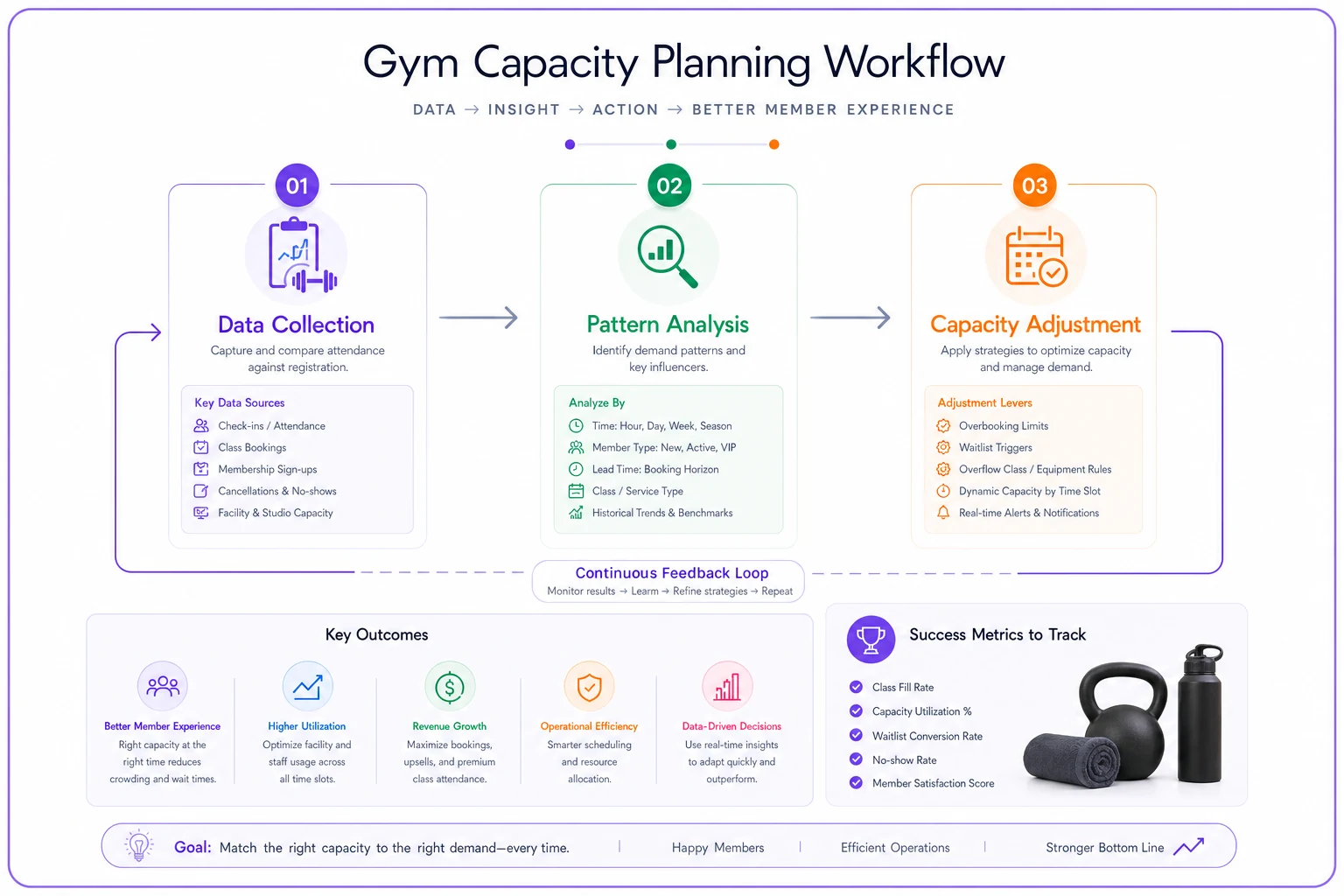
This workflow shows the stages: data collection, pattern analysis, and ongoing capacity adjustments.
-
Data Collection (2 weeks) Tracked every class for actual attendance vs. registration. Built a simple spreadsheet with class type, time, day, registered count, actual count, member types, and booking lead times. No fancy software needed initially—just consistent tracking.
-
Pattern Analysis (1 week) Identified three distinct patterns. Morning classes had a high no-show rate around 22%, mostly unlimited members booking three to five days out. Lunch classes ran a moderate no-show rate of 15%, mixed membership, booking one to two days out. Evening classes had the lowest no-show rate around 8%, mostly class packs, booking same day.
-
Capacity Adjustment (Ongoing) Created different capacity rules for each pattern. Morning classes moved to 120% overbook capacity with waitlist triggering at 115%. Lunch classes ran at 110% overbook with waitlist at 108%. Evening classes stayed tight at 103% overbook with waitlist at 100%.
After eight weeks, class utilization improved from 74% to 89%, waitlist conversion jumped from 31% to 67%, member complaints about availability dropped by roughly half, and revenue per class increased around $47 on average.
The most interesting finding: they cut their Tuesday 2pm yoga entirely after data showed consistent sub-40% attendance. They moved the instructor to a second evening session that immediately filled to capacity.
When Manual Tracking Hits Its Limit
Spreadsheet tracking works initially but breaks down around twenty classes per week. The data entry burden becomes unsustainable, patterns get missed, and decisions lag behind reality by weeks.
AI-powered operational platforms can handle this automatically—tracking attendance patterns in real-time, adjusting capacity rules based on historical data and current bookings, and flagging when a usually-slow class starts filling unexpectedly or when overflow protocols need updating before things get messy.
The automation matters most for multi-location gyms or franchises where capacity complexity multiplies fast. Instead of each location manager guessing at capacity, the system learns optimal levels for each location, class type, and time slot. Front desk staff can focus on actual member needs instead of manually chasing no-shows, and instructors can refine programming instead of managing waitlist logistics.
Making Capacity Planning Sustainable
The best capacity model is one that actually gets used. Start with your five most problematic classes and track them for two weeks. Look for the obvious patterns first—which classes consistently run empty despite being "full," which ones have angry waitlists while bikes sit unused, which instructors have different no-show rates.
Build initial rules conservatively. Slowly expanding capacity as patterns confirm themselves is far better than dealing with overflow chaos. Adjust monthly based on actual results.
Communicate changes to members clearly. When you start overbooking that Monday morning spin class, explain why: "Based on attendance patterns, we're adjusting capacity to make sure more members can book their preferred classes while keeping equipment available." Members respond well to transparency about operational changes that actually benefit them.
The gyms that get this right aren't necessarily the ones with the most complex algorithms. They're the ones paying attention to actual attendance patterns and adjusting accordingly. Your Tuesday 6pm spin class doesn't need anything sophisticated to optimize capacity—it just needs someone to notice that four people no-show every single week and plan around it. Use the data you have, make incremental improvements, and watch utilization climb while member frustration drops.
Ready to elevate your gym operations?
Join 2,000+ gyms using Gymioly to reduce admin overhead, improve member experience, and grow revenue.