



Most gym owners don't have a data problem. They have a trust problem. The dashboard says 412 active members, the billing report says 388, and the front desk swears three walk-ins signed up yesterday that aren't showing anywhere. So the owner does what almost everyone does — stops looking at the dashboard and starts running the gym on gut feel again.
That's the real cost of bad data governance. Not the wrong number itself, but what happens after it. Once a number burns you, you quit trusting the whole system, and every decision goes back to guesswork. Pricing, staffing, retention calls — all of it made blind because the reports "aren't reliable."
The good news is that clean, trustworthy reporting doesn't require a data team. It requires a small set of habits and rules running on a schedule, so problems get caught while they're still one-row mistakes instead of month-end disasters. Here's how the whole thing fits together, where it breaks, and what a realistic owner-run version actually looks like.
Why gym numbers drift in the first place
Gym data is unusually messy compared to most small businesses, and it's worth understanding why before trying to fix it.
Members flow in from several different doors — the front desk POS, the online join page, a class-booking app, sometimes a third-party aggregator like a corporate wellness or day-pass platform. Each of those systems has its own idea of what a "member" is, what a "sale" is, and when money actually moves. Then billing runs on its own clock, refunds happen manually, staff enter freezes and plan changes by hand, and half the time somebody creates a duplicate profile because the search didn't pull up "Mike" when the account said "Michael."
Every one of those is a handoff. And handoffs are where data goes to die.
In practice, drift usually shows up like this: your check-in system counts a member as active because their key fob still works, but billing already flagged them as failed-payment and paused. Now your utilization math is wrong, your revenue-per-member is wrong, and your churn number is quietly understated. None of it is dramatic on any single day. It just compounds.
A pretty common example is a gym that runs a promo in January, imports 60 leads from a spreadsheet, and doesn't map the "source" field. Three months later the owner wants to know which channel actually converts — and the answer is unknowable, because 60 of the best conversions have no source attached. The data wasn't wrong exactly. It was just never governed at the point of entry.
The three-layer rhythm that keeps numbers honest
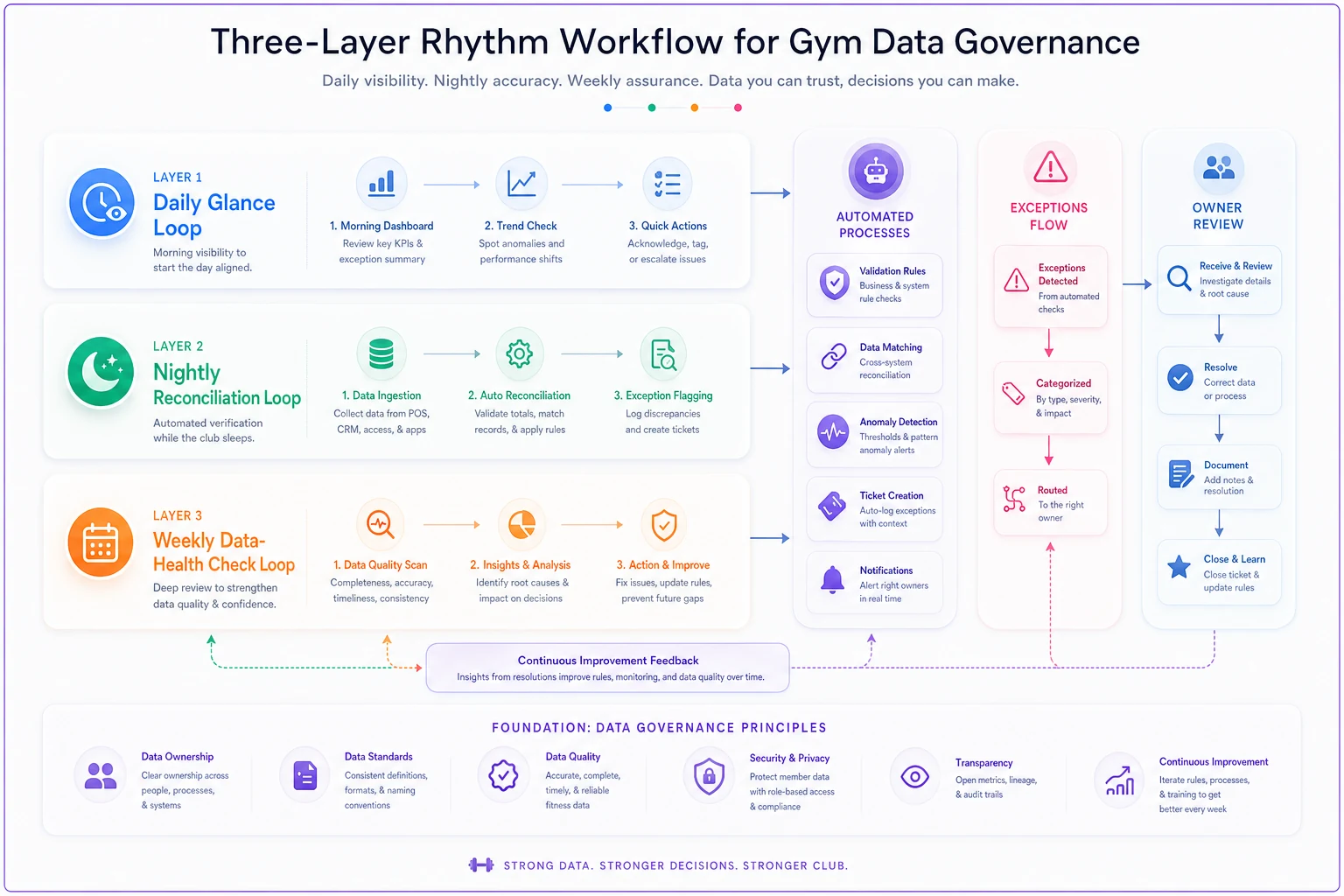
Instead of treating data governance as one big cleanup project, think of it as three loops running at different speeds. Each loop catches a different kind of problem.
End appointment chaos and boost attendance.
Gymioly streamlines booking, confirms sessions, and manages memberships effortlessly.
- Unified class and membership management
- Automated member notifications
- Trainer scheduling and availability
No credit card required
| Loop | Cadence | What it catches | Time cost |
|---|---|---|---|
| Daily glance | 10 min, every morning | Obvious breaks, feeds that didn't sync, weird spikes | Owner or manager |
| Nightly reconciliation | Automated overnight | Money that doesn't match between systems | Set up once, runs itself |
| Weekly data-health check | 20–30 min, one day/week | Duplicates, missing fields, stale records, slow decay | Owner or ops lead |
The daily glance catches things that are visibly broken. The nightly reconciliation catches things that are quietly broken — mostly money. The weekly check catches things that are slowly broken, the rot that accumulates so gradually nobody notices until reporting season.
Skip any one layer and you get a predictable failure. Skip daily, and a broken feed goes unnoticed for a week. Skip nightly, and revenue leaks through refunds and failed payments nobody reconciled. Skip weekly, and your member database slowly fills with ghosts and dupes until your active count is fiction.
Here's a simple visual of how the three loops interact.
Skip any one layer and you get a predictable failure. Skip daily, and a broken feed goes unnoticed for a week. Skip nightly, and revenue leaks through refunds and failed payments nobody reconciled. Skip weekly, and your member database slowly fills with ghosts and dupes until your active count is fiction.
The 10-minute daily check
This is not analysis. It's a smoke test. You're not trying to understand the business at 8am — you're trying to confirm the data pipes are still connected. Here's the actual sequence:
-
Did every feed update? Check the "last synced" timestamp on each connected system — POS, booking, billing, access control. If any of them says yesterday or older, something broke overnight. This alone is the highest-value thing on the list and it takes about 15 seconds.
-
New members vs. new payments. If you added 6 members yesterday but only 4 first payments landed, that's a two-account gap to investigate now, not at month end.
-
Check-ins in a sane range. You know roughly what a Tuesday looks like. If check-ins show 40 when Tuesdays typically run 200, your access data didn't flow.
-
Failed payments queue. Not to fix them here — just to confirm the number isn't suddenly triple normal, which usually signals a processor or card-updater issue, not real churn.
-
Any $0 or negative-value transactions? These are almost always a mistake — a comped session logged wrong, a refund entered as a sale, a plan mispriced.
If all five look normal, you close the tab. Most mornings that's the whole thing. The point is that on the one morning something's wrong, you catch it before it's had time to pollute a week of reports.
One pattern worth flagging: the daily check only works if the same person does it. When "somebody" is supposed to glance at it, nobody does. Assign it to one role and make it the first thing on their opening checklist.
Assign it to one role and make it the first thing on their opening checklist.
One pattern worth flagging: the daily check only works if the same person does it. When "somebody" is supposed to glance at it, nobody does. Assign it to one role and make it the first thing on their opening checklist.
Nightly reconciliation: where the money actually gets matched
This is the layer most gyms never build, and it's the one that quietly costs the most.
Reconciliation just means two systems that should agree on a dollar amount get compared, and any mismatch gets flagged. The classic gym version is your billing system versus your payment processor deposit. Billing says you charged $18,400 for the day. The processor deposited $17,950. That $450 gap is real — it's a refund, a chargeback, a declined card that billing counted as collected, or a fee. You want that surfaced automatically overnight, not discovered when your bookkeeper reconciles the bank statement six weeks later.
-
Billing charged vs. processor settled — catches refunds, chargebacks, and phantom collections
-
New memberships created vs. first payments captured — catches signups that never actually started paying
-
Freezes/cancellations processed vs. still-billing — catches the account someone "cancelled" that's still charging (or the reverse, a member charged after they froze)
-
Class/PT bookings vs. session revenue — catches comped or unbilled sessions
-
Access-granted members vs. active-paying members — catches people using the gym who aren't paying
You don't read these reports every night. You set thresholds. Match within a few dollars of expected fee variance? Silence. Gap over some threshold you pick? It lands in an exceptions list you review with your morning coffee. The whole philosophy is exception-based — the system only bothers you when something doesn't tie out.
This is the kind of repetitive, rules-based work that AI-assisted operational platforms handle well. Overnight, the software compares the two feeds, applies your field-matching rules, ignores expected small variances, and hands you a short list of only the transactions that actually disagree. What used to be a bookkeeper's monthly project becomes a five-item exceptions queue you clear before opening. The value isn't magic — it's that a boring, error-prone comparison runs every single night without anyone remembering to do it.
Field-matching rules: the boring layer that fixes everything upstream
Here's the part nobody wants to deal with, and it's the root cause of half your reporting pain: your systems don't agree on what fields mean.
-
Identity matching. How do you decide two records are the same person? Email is better than name. Phone is decent. Name-plus-DOB is a fallback. Without a rule, "Michael Torres" and "Mike Torres" become two members, two histories, and a split view of one person's actual behavior.
-
Source normalization. "IG," "Instagram," "instagram ad," and "social" should all collapse to one value. Otherwise your channel report is confetti.
-
Status definitions. What counts as "active"? Paying this month? Fob works? Attended in 30 days? Pick one canonical definition and force every report to use it. Most gyms have three silent definitions running at once, which is why three reports show three different member counts.
-
Money timing. Does revenue count when charged or when settled? Pick one and apply it everywhere.
The insight most owners miss: you can clean data downstream forever and it won't stick, because the mess regenerates upstream every day. Field-matching rules fix it at the point of entry. It's the difference between mopping the floor and turning off the faucet.
This is also where integration decisions come back to haunt you. When systems are connected sloppily, field mismatches multiply — worth reading through our provider-neutral checklist for avoiding integration traps before adding yet another tool to the stack, because every new connection is a new place for definitions to disagree.
Weekly data-health check: catching the slow rot
Once a week, spend 20–30 minutes hunting for decay. These aren't emergencies — they're the slow leaks that make month-end reports embarrassing.
-
Duplicate members — search for matching emails or phones with different profiles
-
Missing critical fields — new members with no source, no plan type, no start date
-
Stale statuses — "trial" members whose trial ended 40 days ago and never converted or closed
-
Orphaned records — payments not linked to any member, bookings for members who don't exist
-
Freeze overruns — freezes that were supposed to end and didn't
-
Refund clustering — a spike of refunds from one staff member or one day worth a closer look
The pattern that surprises most owners: it's almost always the same three or four field types breaking, over and over. Once you see which fields rot in your specific operation, you can add a required-field gate at entry and that whole category of problem largely disappears. Data health is less about heroic weekly cleanups and more about spotting your recurring failure and closing it off.
Reporting SLAs: deciding how fresh "fresh enough" is
Not every number needs to be real-time, and pretending otherwise creates false urgency and wasted effort.
-
Daily-fresh check-ins, new signups, failed payments. If these are stale, you find out in the morning check.
-
Next-day-accurate revenue, refunds, reconciliations. Yesterday's money should be fully settled and matched by mid-morning today.
-
Weekly-accurate churn, retention cohorts, channel attribution. These don't move meaningfully hour to hour, and forcing them to be live just invites noise.
Assigning freshness levels stops two failure modes at once. It stops people from panicking over a retention number that's simply not settled yet, and it stops genuinely urgent breaks — like a dead payment feed — from sitting for days because "the report always looks a little off." Once you know what should be fresh, a break becomes obvious instead of ambiguous.
If you're still building the underlying metric set that these SLAs sit on top of, it's worth grounding the whole thing in a proper measurables hierarchy — the KPIs, dashboards, and cadences that actually drive decisions, because governance without a clear metric hierarchy just means you're carefully protecting numbers nobody uses.
What changes as you grow
At one location with 300–500 members, you can honestly hold most of this in your head. You know a Tuesday should be around 200 check-ins. You notice when signups look light. A lot of governance at this stage is just one attentive owner doing the daily glance.
The trouble is that intuition doesn't scale, and it doesn't transfer. Add a second location, or hand the gym to a general manager, and the "I just know when it's off" system evaporates overnight. What was gut feel now has to become a written rule, a threshold, an exceptions queue — because the new person doesn't have three years of Tuesdays in their head.
This is where owners get blindsided. Systems that ran fine at one site produce garbage across three, because each location enters data slightly differently. One front desk logs sources, another doesn't. One calls it "annual," another "yearly," a third "12-mo." Suddenly your consolidated report is unusable and you can't even tell which location is actually performing. Governance stops being optional the moment more than one person touches the data.
A real scenario
A single-location strength-and-conditioning gym, roughly 380 members, was running on a POS, a separate booking app, and a billing system that only sort of talked to each other. The owner did month-end reconciliation by hand, and it took most of a Saturday.
Two problems kept surfacing. First, their "active member" count swung by 20–30 depending on which report they pulled, because access control and billing disagreed on the definition. Second, they were losing money to refunds and cancelled-but-still-billing accounts that nobody caught until a member complained.
They didn't hire anyone. They set up a nightly reconciliation between billing and their processor with a small variance threshold, wrote three field-matching rules — identity on email, one canonical "active" definition, normalized plan names — and put a five-item daily glance on the opening checklist.
The Saturday reconciliation dropped to a short exceptions review a few times a week. Over the first couple of months they caught around a dozen accounts that were either billing after cancellation or using the gym without paying — a few hundred dollars a month in recovered and prevented leakage. The bigger win wasn't the money, though. The member count finally matched across reports, so the owner started actually using the dashboard for staffing and retention decisions again. The number became trustworthy, so it became useful.
When to bother — and when not to
This makes sense when you're already running the gym off reports and getting burned by numbers that don't match, or when you're about to hand day-to-day operations to a manager and can't rely on your own instincts anymore.
This is overkill when you're a brand-new gym with 40 members and one system. At that size you can see everything. Building elaborate reconciliations before you have anything to reconcile is just procrastination dressed up as diligence.
Don't do the full build if your real problem is too many disconnected tools. Governance on top of a broken integration is polishing a leak. Fix the plumbing first, then layer the rhythm on top.
The whole idea here isn't to turn yourself into a data analyst. It's the opposite — it's to build enough structure that you don't have to be one. Three loops running at three speeds, a handful of rules that keep entry clean, and clear expectations about what should be fresh. Do that, and the dashboard stops being something you argue with and starts being something you actually run the gym by.
Ready to elevate your gym operations?
Join 2,000+ gyms using Gymioly to reduce admin overhead, improve member experience, and grow revenue.