

Most gyms don't have a vendor problem in the sense of "bad vendors." They have a governance problem. Contracts get signed reactively, renewals auto-charge without anyone looking, and the only time a vendor gets real attention is when something breaks — the card processor goes down on a Monday morning, or the cleaning company skips two days and members start posting locker room photos online.
Nobody tells you when you open a gym how many vendors you actually accumulate. Payment processor, access control, cleaning, HVAC service, equipment maintenance, laundry (if you do towels), pest control, waste, internet/phone, software stack, pool chemicals, maybe a smoothie bar supplier. By year two you're easily running 15–25 active vendor relationships, and almost none of them are tied to any kind of standard or review.
This article is about building the connective tissue: how to tier vendors by risk, write SLAs that actually mean something, score them monthly, run procurement on a calendar instead of by panic, and connect CAPEX triggers to the numbers you already track. Gym vendor management SLA work isn't glamorous, but it's one of the few areas where tightening the system directly protects both member experience and margin at the same time.
Why vendor governance quietly falls apart
Vendors get onboarded one at a time, over years, by different people, under different pressures. The card processor was set up during buildout. The cleaning contract was signed by a manager who's since left. The equipment service plan came bundled with the original purchase and nobody remembers the terms.
So instead of a system, you end up with a drawer of PDFs and a pile of recurring charges. There's no shared definition of what "good" looks like for any given vendor, which means there's no real way to hold anyone accountable when performance drifts.
-
No single owner. Everyone assumes someone else is watching the relationship. Nobody is.
-
Renewals on autopilot. Annual contracts roll over silently, often with a price bump you agreed to 18 months ago and forgot about.
-
Response expectations live only in people's heads. "They usually come out pretty fast" is not an SLA.
-
No comparison data. When it's time to renegotiate, you have no record of how the vendor actually performed, so you're negotiating on vibes.
This matters more for gyms than, say, a retail shop because a lot of your vendors touch either member experience (cleaning, HVAC, access, equipment) or cash flow (payments, software). A quiet vendor failure doesn't stay quiet — it shows up as a cancellation, a bad review, or a chargeback spike.
Tier your vendors before you do anything else
You can't apply the same rigor to every vendor, and you shouldn't try. The pest control company you see quarterly does not need a monthly scorecard. Your payment processor does. Tiering is how you decide where to spend governance energy.
End appointment chaos and boost attendance.
Gymioly streamlines booking, confirms sessions, and manages memberships effortlessly.
- Unified class and membership management
- Automated member notifications
- Trainer scheduling and availability
No credit card required
The cleanest way to think about it: how badly does a failure hurt, and how fast does that damage happen? A payment processor outage hurts a lot and hurts immediately. A slow uniform supplier is annoying but rarely urgent.
| Tier | What it covers | Failure impact | Governance level |
|---|---|---|---|
| Tier 1 – Critical | Payments, access control, core software, HVAC, primary equipment service | Immediate revenue loss or member lockout | Full SLA, monthly scorecard, named owner, backup vendor identified |
| Tier 2 – Important | Cleaning, laundry, internet/phone, pool chemicals | Degrades experience within days | SLA on response times, quarterly review |
| Tier 3 – Routine | Pest control, waste, office supplies, minor consumables | Low/slow impact | Basic terms, annual review, price check |
One thing most owners miss: a vendor's tier can change with your business. When you're running 200 members, your internet going down is a mild inconvenience. When you're at 1,400 members with app-based check-in, digital classes streaming, and cloud-based access control, that same internet line just jumped from Tier 2 to Tier 1. Re-tier at least once a year, and immediately after any major operational change.
Don't confuse how much you spend with tier either. Your cleaning contract might cost more than your access control software, but a member locked out at 5am is a bigger fire than a slightly-less-shiny floor. Tier by impact, not invoice size.
Writing SLAs that actually hold up
Most vendor agreements gyms sign are just pricing sheets with legal boilerplate. A real SLA defines what the vendor owes you in measurable terms, what happens when they miss, and how you'll both know.
For gym vendors, an SLA should nail down a handful of specifics:
-
Response time vs. resolution time. These are different, and vendors love to blur them. "We'll respond within 4 hours" can mean an email acknowledging your problem — not a technician on site. Separate the two: response (acknowledged), on-site or remote engagement, and resolution (fixed).
-
Coverage windows. A cheaper HVAC contract that only covers business hours is worthless when the unit fails on a Saturday and your top floor hits 84 degrees. Spell out weekend and after-hours terms.
-
Escalation path. Who do you call when the first-line tech can't fix it? Get names and a second number in writing.
-
Performance thresholds. Uptime for software (e.g., 99.5%), max downtime per incident, or number of allowable misses per quarter for a service vendor.
-
Remedies. What you get when they miss — service credits, fee reductions, or a right to terminate without penalty after repeated failures. An SLA with no teeth is just a suggestion.
-
Data and offboarding terms. Especially for software. How you get your data out, in what format, and how fast if you leave.
That last point connects to a broader issue — a lot of gym pain comes from tools that don't play nicely together or hold your data hostage. If you're evaluating software vendors, the thinking in this provider-neutral checklist to minimize integration friction and protect your data applies directly to how you write software SLAs.
A quick example of vague versus specific:
-
Vague "Vendor will maintain equipment in good working order."
-
Specific "Vendor will respond to reported cardio-equipment faults within 24 business hours, resolve within 72 hours, and provide a loaner or repair timeline for any unit down more than 5 days. More than 3 units down simultaneously triggers same-day response."
The second version is enforceable. The first is a shrug.
When a heavy SLA is overkill
Don't write a 6-page SLA for your Tier 3 waste hauler. You'll spend more time drafting and monitoring it than the relationship is worth, and the vendor probably won't sign it anyway. For routine vendors, a simple terms sheet with a price, a service frequency, and a 30-day out clause is plenty. Save the real SLA work for Tier 1 and the response-time-sensitive parts of Tier 2.
Monthly scorecards: turning "they seem fine" into data
An SLA sets expectations. A scorecard tells you whether they're being met. Without it, you find out a vendor's been slipping only when the slippage becomes a crisis.
The trick is keeping scorecards light enough that you'll actually maintain them. Nobody sticks with a 40-field vendor evaluation form. Three to five metrics per vendor is the sweet spot.
-
On-time response rate (% of tickets acknowledged within SLA window)
-
On-time resolution rate (% fixed within SLA window)
-
Repeat failures (same unit breaking again within 30 days)
-
Downtime hours on member-facing equipment
-
Invoice accuracy (billed vs. quoted)
Score each red / yellow / green, keep a rolling three-month view, and you'll spot drift long before it becomes a problem. A vendor that goes green-green-yellow-yellow over four months is telling you something a single bad month wouldn't.
Vendors tend to perform best right after signing and slowly regress once they feel comfortable. Scorecards catch that regression at month four instead of at renewal, when you've already lost your leverage.
Keep scorecards to 3–5 metrics so they'll actually get completed each month.
Tie the scorecard back to your broader operating rhythm. If you already run a measurables cadence in the business, vendor scores are just another input feeding the same monthly review — so a bad number always has an owner.
The procurement calendar: stop negotiating from panic
A governance mistake that costs real money: everything gets renewed at the last minute. A contract lapses or auto-renews, and you're stuck either paying whatever the new rate is or scrambling to find a replacement while operating without coverage.
A procurement calendar fixes this by pulling every renewal, review, and price check onto a single timeline with lead time built in before each decision point. The goal isn't to renegotiate everything constantly — it's to make sure no decision happens under time pressure.
A visual workflow of the procurement calendar helps make the deadlines obvious.
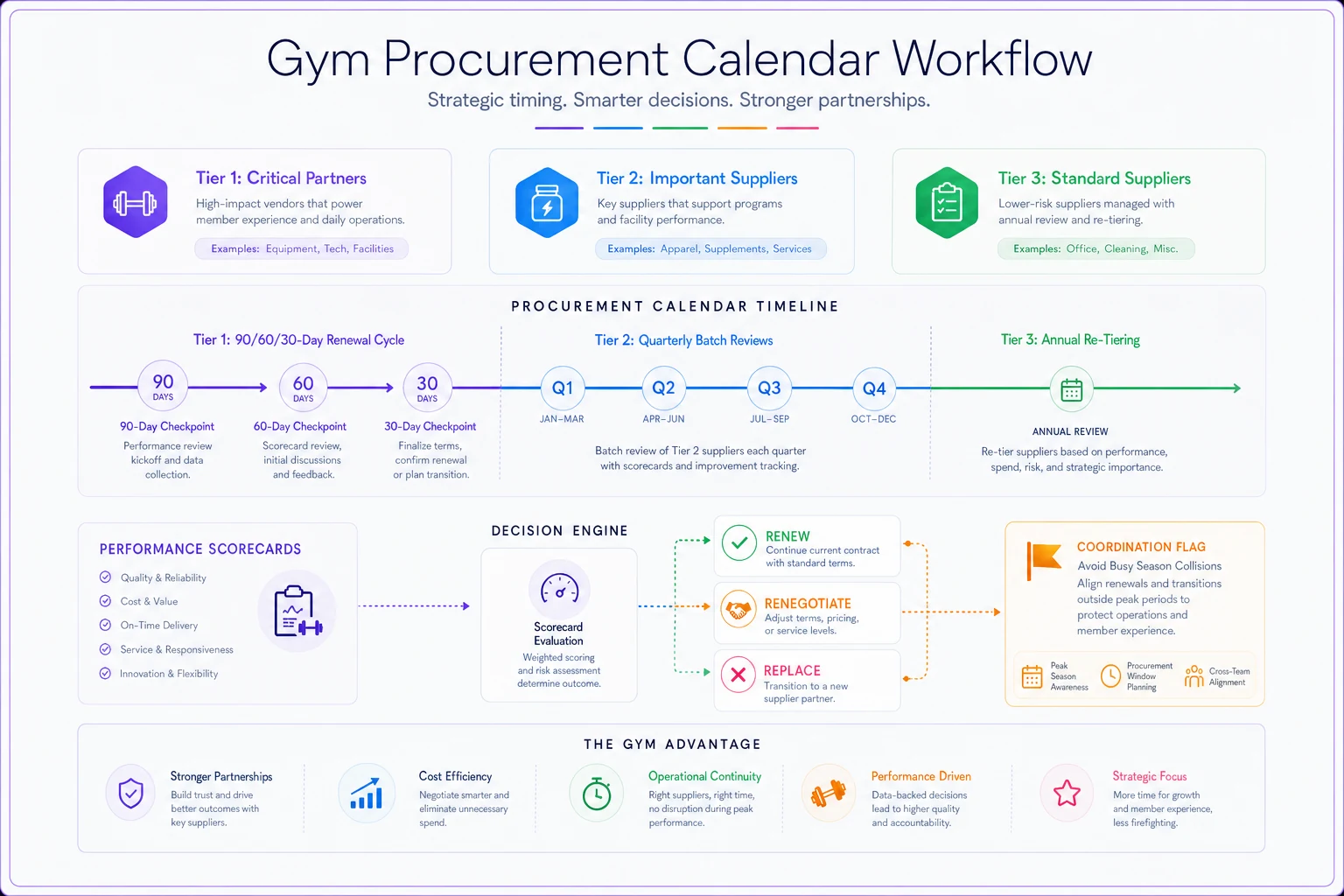
A workable annual rhythm looks like this:
-
90 days out from any Tier 1 renewal pull the scorecard history, decide renew / renegotiate / replace, and if replacing, start sourcing alternatives.
-
60 days out get competing quotes for anything you're renegotiating. Even if you stay, quotes are leverage.
-
30 days out finalize terms, update the SLA, confirm new pricing in writing.
-
Quarterly review all Tier 2 vendors as a batch — one afternoon, four times a year.
-
Annually re-tier every vendor, price-check Tier 3, and cut anything you're paying for but not using.
That last item catches more money than people expect. Gyms routinely carry a dead software subscription, a duplicate service, or a consumable delivery that's bigger than current usage. Reading your card and bank statements line by line once a year usually surfaces a few hundred dollars a month of stuff nobody's actively using.
The other benefit of a calendar is coordination. When one person owns the schedule, renewals stop colliding with your busy season. You don't want your HVAC contract, your software renewal, and your equipment lease all coming due in January if that's your biggest signup month and everyone's slammed.
Mapping CAPEX triggers to your measurables
This is where governance stops being paperwork and starts driving real decisions. The best-run gyms don't decide on major spend by gut feel or by waiting for something to fully break. They set triggers — specific thresholds in the numbers they already track that automatically kick off a capital decision.
Instead of "the treadmills feel old," you have "when a machine's trailing-12-month repair cost exceeds 40% of replacement cost, it flags for replacement review." The number makes the decision before the machine dies in front of a member.
-
Repair-cost-to-replacement ratio on any single piece of equipment crossing a set threshold.
-
Downtime frequency — a unit down more than X times in a quarter, regardless of repair cost, because member frustration has its own cost.
-
Utilization pressure — when peak-hour usage on a machine class hits a level where wait times start showing up in member feedback, that's a signal to add capacity, not just maintain existing units.
-
SLA failure rate on a service vendor — if the vendor keeping equipment alive keeps missing, the real fix might be replacing the asset, not the vendor.
These triggers should map onto the same measurables hierarchy you use to run the gym day to day — top-level outcomes (retention, revenue per member) supported by operational drivers (equipment uptime, class availability) supported by vendor performance. When a vendor scorecard goes red and it's dragging an operational driver that feeds a top-level outcome, you've got a clear line from "vendor missed" to "this is costing us members." That line is what justifies the CAPEX.
For the deeper mechanics on connecting maintenance schedules, forecasting replacement costs, and building vendor playbooks around uptime, this companion piece on utilization-tied preventive maintenance and CAPEX forecasting goes further than we can cover here.
When triggers actually make sense — and when they don't
Triggers work well for high-count, repairable, member-facing assets: cardio equipment, HVAC, pool systems. They're less useful for one-off or low-value items where a simple "replace when broken" rule is cheaper to run than a monitoring threshold. Don't build a trigger system for your office chairs. Build it for the stuff whose failure a paying member will notice.
A realistic scenario
Consider a single-location gym running around 1,100 members, doing roughly $85k–$95k a month in revenue. Before tightening vendor governance, their setup looked like most: contracts in a drawer, no scorecards, renewals on autopilot, equipment fixed reactively.
Over about six months, they made a few changes — tiered their 18 or so vendors, put real SLAs on the five Tier 1 relationships, started a lightweight monthly scorecard for equipment service and payments, and built a procurement calendar with 90-day lead times.
-
The annual sweep found two subscriptions and an oversized towel-service delivery nobody needed — roughly $250–$300/month in dead spend.
-
Renegotiating the equipment service contract off a scorecard showing consistent missed response windows knocked about 12% off the annual fee and tightened the response SLA.
-
A repair-cost trigger flagged three aging cardio units before they failed, so replacements got scheduled during a slow month instead of peak season with members watching a "temporarily out of order" sign for weeks.
Nothing here was a silver bullet. It was just a system replacing a scramble. The owner's words afterward: "The vendor stuff finally stopped being a series of surprises."
Where this connects to resilience
Vendor governance isn't a standalone project — it's one layer of how well your gym holds up when something goes wrong. A tiered vendor list with clear escalation paths is exactly what you reach for during any disruption, from an equipment failure to a temporary closure. If you're thinking about the bigger picture, it's worth pairing this with your business-resilience playbook covering triage, closure billing rules and insurer notifications, since your Tier 1 vendors are usually the first calls you make in a crisis.
The through-line across all of it: your vendors, your equipment, your cash flow, and your member experience are one connected system. A missed SLA isn't just a vendor problem — it's a downtime problem, which is a retention problem, which is a revenue problem. Governance is just making those connections visible early enough to act on.
Getting started without boiling the ocean
You don't need to build all of this in a weekend. A realistic order of operations:
-
Week 1 List every vendor and every recurring charge. This alone usually surfaces surprises.
-
Week 2 Tier them. Identify your true Tier 1 five or six.
-
Weeks 3–4 Write or rewrite SLAs for Tier 1 only. Assign an owner to each.
-
Month 2 Stand up simple scorecards for Tier 1 and start collecting data.
-
Month 3 Build the procurement calendar and define your first CAPEX triggers on equipment.
The whole thing is less about perfect documents and more about creating a rhythm where vendors get reviewed on a schedule, performance gets measured, and big spending decisions get triggered by numbers instead of emergencies. Once that rhythm exists, vendor management stops eating your Mondays and starts quietly protecting your margin and your members — which is exactly what good governance is supposed to do.
The whole thing is less about perfect documents and more about creating a rhythm where vendors get reviewed on a schedule, performance gets measured, and big spending decisions get triggered by numbers instead of emergencies. Once that rhythm exists, vendor management stops eating your Mondays and starts quietly protecting your margin and your members — which is exactly what good governance is supposed to do.
Ready to elevate your gym operations?
Join 2,000+ gyms using Gymioly to reduce admin overhead, improve member experience, and grow revenue.